Your dev tools are hoarding gigabytes.
DerivedData, old simulators, node_modules in projects you forgot, Gradle and pip caches, a 9 GB model you tried once. DevSweep maps all of it, marks what your tools rebuild on their own, and sweeps it while you watch.
Pay once · macOS 14+ · Apple silicon & Intel · ~4 MB download · Already bought? Download DevSweep
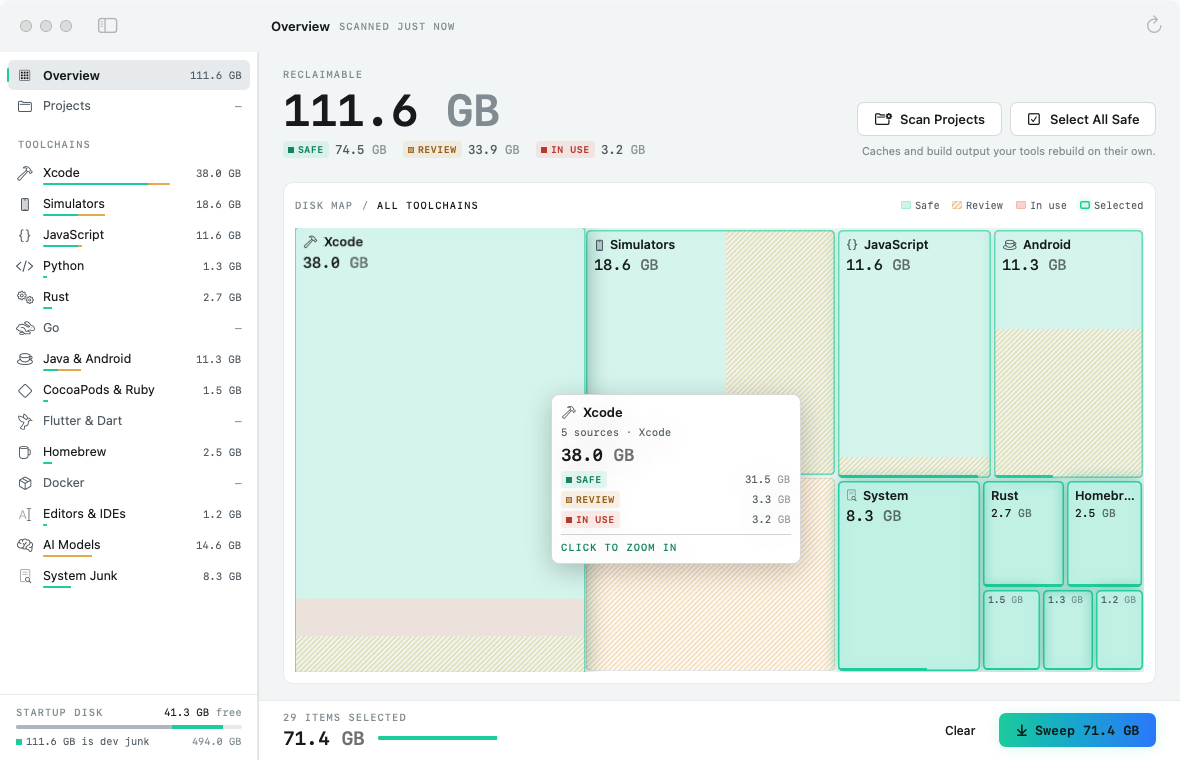
A working model, not a video — sample data. It sweeps a made-up disk: the page can’t see your files, and nothing on your computer is touched. The real DevSweep measures your caches the moment it opens, and nothing goes until you confirm.
- Pay once, no subscription
- No account
- Moves to the Trash by default
- Native on Apple silicon & Intel
- 14-day refund
Every corner developers forget.
Each item says what it is, whether your tools rebuild it on their own, and exactly how much space you’ll get back. DevSweep only shows what it finds on your Mac.
A map of the mess
The Disk Map draws every toolchain as a block sized by what you’d get back: solid for safe, hatched for review, red for in use. Click one to zoom in, click an item to select it.
Xcode and simulators
DerivedData per project, Device Support for every iPhone you ever plugged in, Archives, previews and Swift Package caches, plus unavailable simulators via simctl.
JavaScript
npm, Yarn, pnpm and Bun caches, node-gyp and Electron downloads, Deno, and the browsers Playwright, Puppeteer and Cypress keep downloading.
Python, Rust and Go
pip, Poetry, uv and pipenv caches, conda packages, the Cargo registry, old rustup toolchains, and Go’s build and module caches (read-only files handled for you).
Java, Android and Flutter
Gradle caches and old distributions, Maven, Android emulators and system images, Studio caches, the pub cache, CocoaPods, Carthage and gem caches.
AI models
Ollama, LM Studio, Hugging Face, PyTorch and Whisper weights — often the biggest surprise on the disk. Marked Review, so they never go by accident.
Docker, Homebrew and editors
docker system prune with the size up front, old Homebrew downloads and formula versions, VS Code, Cursor, Windsurf and JetBrains caches, logs and other app caches.
Forgotten projects
It walks your code folders for node_modules, .next, Rust target, Pods, .venv, build and .build. Filter to repos untouched for 30 days, 90 days or a year.
A sweep you can watch
Review the list, choose Trash or delete, then watch a calm log tick through each item with a running total. Stop at any point and the rest stays untouched.
Know what’s safe before it goes.
Every item carries one of three labels. “Select All Safe” only ever picks the first kind; the rest are yours to tick.
Moving to the Trash is the default, so anything can come back until you empty it. Every item has “Show in Finder”, and anything touched in the last hour is marked in use and never selected for you.
Caches and build output your tools rebuild on their own: DerivedData, npm and Gradle caches, node_modules.
Re-downloadable, but you may want them: Xcode archives, simulators, emulators, AI models.
Touched in the last hour (projects: the last day) — probably open in Xcode or a running tool.
Every screen, light and dark.
Screenshots straight from DevSweep, with sample data. Flip between light and dark.


What stays. What connects.
DevSweep measures and cleans on your Mac. Your file names and project list never leave it.
Stays on your Mac
Everything DevSweep measures, and everything it removes.
- ✓Your caches and build foldersMeasured in place, never uploaded
- ✓Your project foldersThe ones you point it at, in its preferences
- ✓What you sweepMoved to your Trash, or deleted on your Mac
- ✓How you use itNo analytics or tracking in the app
Connects
Two small requests, over HTTPS.
- 1License checkYour key and an activation ID, to Dodo Payments
- 2Update checkApp name and version, to
devsweep.newmac.app
The full list, for every app, is in the privacy policy.
Pay once. Keep it.
One payment, no subscription. Choose how many Macs you’ll use DevSweep on.
3 Macs
For your home and work Macs
Checkout opens soon. The buttons above go live here the moment it does.
Every plan includes
- One payment, no subscriptionEvery feature, yours to keep.
- License key by emailSent the moment you pay. Activate in one click.
- Move between MacsUse “Deactivate this Mac”, then activate on the new one.
- Free updatesNew versions install themselves.
- 14-day refundNot for you? Read the refund policy.
- macOS 14 or laterNative on Apple silicon & Intel.
Already bought? Download DevSweep · .zip · Install help
Questions, answered.
Will cleaning break my projects?
Items marked Safe are caches and build output. Your tools recreate them the next time you build or install — it just takes a little longer that first time. Items marked Review are things you may want to keep, like Xcode archives or AI models, and DevSweep never selects them for you.
Where does it look for projects?
In the usual places — Developer, Projects, Code, src, GitHub, the Android Studio and JetBrains project folders, Documents, Desktop and more — plus any folder you add. Symlinks are never followed, and a repo needs over 1 MB of dependencies or build output to be listed.
Does it need Xcode, Docker or Homebrew installed?
No. DevSweep only shows tools it finds. Command-based clean-ups (unavailable simulators, Docker, Homebrew) appear when the tool is installed.
Why is Docker showing 0?
Docker has to be running for DevSweep to ask it how much is reclaimable. Start Docker Desktop or OrbStack and scan again.
Where does the space go if I use Move to Trash?
It stays in the Trash until you empty it, so you can still put anything back. Choose “Delete permanently” in the sweep sheet to free the space right away.
macOS says it can’t verify the developer.
DevSweep is distributed directly from this website. Here’s how to open it the first time.
Is there a free trial?
No. Use the working model at the top of this page, or watch the demo video, to see exactly how DevSweep works. If it turns out not to be for you, you can ask for a refund within 14 days — see the refund policy.
Can I use DevSweep on more than one Mac?
Yes. The 3-Mac and 5-Mac plans cover several Macs with one license key. Any license can move to a new Mac: choose “Deactivate this Mac” in DevSweep on the old one, then activate on the new one.
Comparing Mac cleaners for developers? Read the guide.
Find out how much you’ll get back.
The scan takes seconds. What goes, and where it goes, is up to you.